
Initial Data Synchronization
This section explains how to synchronize initial data from ERPLY Inventory to ERPLY Books. Open in ERPLY Book’s “Settings” > “ERPLY POS & Inventory Settings”.
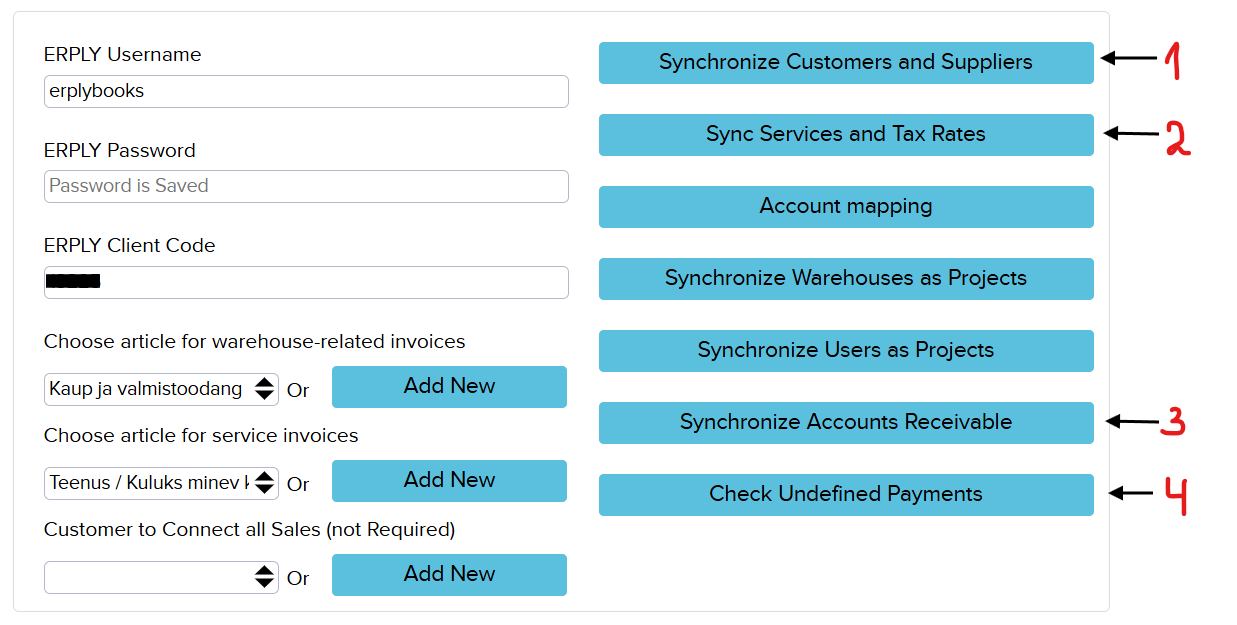
The available initial synchronization options are:
1.“Synchronize Customers and Suppliers” – This option imports all customers and suppliers from ERPLY Inventory into ERPLY Books. Although customers and suppliers are also synchronized during the regular synchronization process, importing them in advance reduces the time required for the initial synchronization.
2. “Sync Services and Tax Rates” – This option synchronizes purchase and sales articles together with VAT rates. When you click the button, a window opens where you can choose whether to synchronize Tax rates, articles, or both.
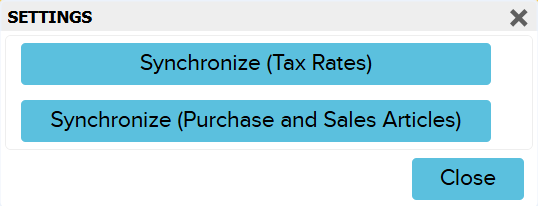
In Purchase and sales articles manual you can learn how to synchronize specific product fields from ERPLY Inventory to product articles in ERPLY Books, as well as how to synchronize all products and inventory quantities from ERPLY Inventory.
3. “Synchronize Accounts Receivable” – Use this option if you have already been using ERPLY Inventory and later decide to start using ERPLY Books. It synchronizes customers’ current outstanding balances to ERPLY Books. If you are a new customer starting with both systems at the same time, you do not need to use this option.
4. “Check Undefined Payments” – This option is intended for companies that have previously used ERPLY Inventory and do not want to synchronize all historical data into ERPLY Books. It checks customer prepayments that do not need to be synchronized, helping to reduce synchronization time and avoid importing unnecessary historical data. New customers do not need to use this option.
For more information about the ERPLY POS & Inventory integration you will find here!
If you have any questions, feel free to contact us at info@erplybooks.com.