Transaction and Entry Dates
In ERPLY entry dates are locked and cannot be modified by the user. This is the moment when the transaction is confirmed, which is why it may differ from the actual date of the transaction. By default, transactions are synchronised so that both the document date and the entry date are the document date. If you want synchronisation to work so that the document date is one date and the entry date is the inventory entry date, contact us at support@erplybooks.com.
Due to the difference in entry dates between ERPLY and Books, a situation may arise where the ERPLY sales-inventory turnover and the ERPLY Books sales report do not match. Due to the FIFO inventory accounting methodology, this is an understandable situation, and in accounting you should monitor that the ERPLY sales-sales turnover matches the ERPLY Books sales report.
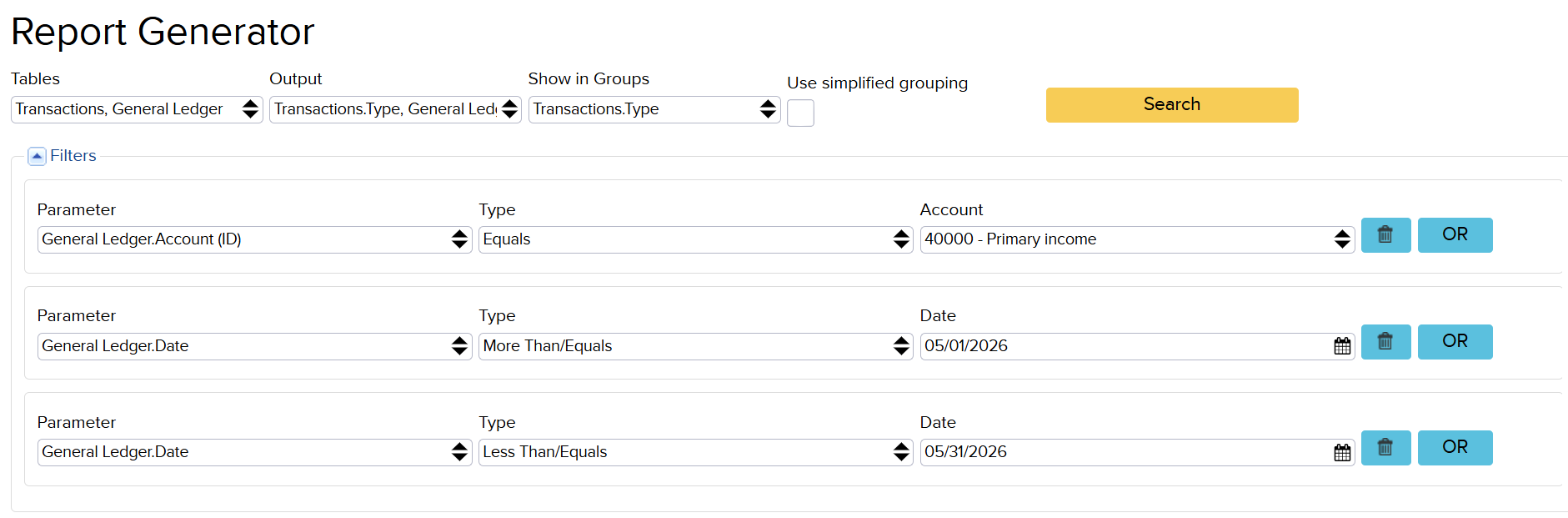
Kui soovid näha tehinguid, mis jäävad lao kande tõttu ühte kuusse ning müügikäibe aruande järgi teise, siis selleks saad koostada aruandegeneraatoris järgmise aruande (väljundisse Kanded.Tüüp, Pearaamat.Deebet, Pearaamat.Kreedit):
If you want to see transactions that fall into one month based on the inventory entry and into another month based on the sales turnover report, you can create the following report in the report generator (with Transactions.Type, General Ledger.Debit, General Ledger.Credit as Output):