
KYC Process
To ensure legality and security, it is necessary to verify whether the person acting on behalf of a company is actually its official representative and has the appropriate authority to make decisions. This process is called KYC (Know Your Customer).
The KYC verification may take up to 1 business day.
KYC Process
The simplest and most effective way to complete the KYC process is to verify your identity using Smart-ID. During this process, the system automatically checks whether the person is listed on the company’s registry card and has the right to represent the company.
To complete the KYC process, open “Settings” → “Organisation Data” and click the “KYC” button in the submenu. Next, select the appropriate country and enter the personal identification code (Reg. no.:).
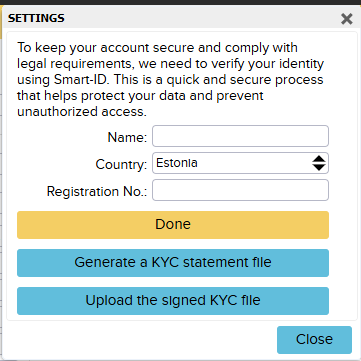
Alternatively, you can request a digitally signed statement from a member who has the right to represent the company. To do this:
Enter the company’s registration number (for a Finnish company, the Y-tunnus). This is required to link the KYC process to the company and identify the legal entity in question. Then click “Generate a KYC statement file”.
After entering the Y-tunnus, the system automatically creates a PDF file containing:
- the company’s name and registration number
- a unique KYC identifier generated by the system
The user:
- digitally signs the PDF file
- uploads the signed PDF file back to the system in the same section by clicking “Upload the signed KYC file”
In general, the verification is performed automatically by the system. If necessary, the ERPLY Books team will verify:
- whether the file contains the unique identifier generated by us
- whether the person who signed the document is actually an authorized representative of the company (verified through the country’s business register)
If all requirements are met:
- The KYC status in the system is marked as “Passed” and a confirmation is sent by email.
If the requirements are not met, for example, if another person signed the document:
- The user will receive a corresponding notification and will be asked to complete the process again. If KYC has not been completed, certain features cannot be used.
If you encounter any problems with the KYC signing process, please contact support@erplybooks.com.